the McKennas
  • Home
  • News
  • The Crew
    • Elise
    • Jess
    • Sean
    • Cosmo
    • Sadie
    • Gumpy
  • D.I.Y.
    • Exorcism
    • Exterior
    • Patio
    • Second Floor
    • Bathroom
    • Remodel 2006
    • Kitchen TV
    • Finishing
  • Multimedia
  • Photos+
  • Links

Our Sophomore Story Effort

9/26/2014

2 Comments


The Last banana
by
Elise and daddy

After dinner one night, Elise's tummy said to her, "I'm hungry."  So Daddy asked her, "Would you like a banana?" and Elise said, "Yes, The Last Banana."  Even though there was only one banana, Elise said there were still apples and pears to eat.  Nonetheless, Elise said that, "We need to get more bananas."  And Elise added that we get bananas at the grocery store. Meanwhile, Elise was hard at work eating The Last Banana, while enlightening us with her observation that, "Monkeys like bananas - and so do I." So, she ate it all.

THE END
2 Comments

Elise, the Author

8/7/2014

1 Comment


Bunny GooGoo
by
Elise & Daddy

There was a bunny named Scotty, but Elise called him GooGoo.  One day, the bunny ate all of Elise’s lunch.  And he drank all of her lemonade-water, as well as Daddy’s fizzy water.  And he went under Daddy’s shirt.  Then, Daddy wore his shirt and the bunny got out!  Then the bunny stole Daddy’s pencils and ran away.

THE END

1 Comment

5 Yrs with the modern Website - time for a new look

7/29/2014

2 Comments

 
Weebly recently made some changes that have affected the layout of theMcKennas.net, so it was time for some rebuilding.  That, and I just realized it's been 5 years, almost to the day, that I moved to the Weebly platform.  So, stay tuned as we tweak things and get everything looking good and in working order!
2 Comments

Mark Your Calendars!

4/25/2014

0 Comments

 
Picture
Get out your Summer Solstice underwear, because we're throwing a party on June 21st.  It should be a brilliantly good time.  Why?  Live music, I say!  That's right, all the way from Long Island, NY, the talented and entertaining duo, Martin & Lucas will be performing right here at 5 Marmion.  Look for an Evite in the weeks to come.

M & L Logo
0 Comments

How to Put a Toddler to Bed in 100 Easy Steps (reprinted)

3/17/2014

1 Comment

 
1. Announce that it’s time to go to bed.
2. Wait for your toddler to stop crying
3. Explain that  bedtime is not a punishment
4. Explain that bedtime is not a new concept.
5. Explain that, yes, bedtime will happen every night.
6. Console your toddler.
7. Announce that it’s still bedtime.
8. Let your toddler know that we don’t call names in this house.
9. Tell your toddler it’s time to go upstairs.
10. Watch your toddler move at a snail’s pace.
11. Wait for your toddler to stop crying.
12. Pick up your toddler.
13. Walk your toddler upstairs.
14. Pick out the wrong pair of pajamas for your toddler
15. Pick out another wrong pair of pajamas for your toddler
16. Explain that the right pair of pajamas are in the wash.
17. Explain that you will not be doing a load of laundry this evening
18. Console your toddler while he/she cries
19 Explain that in this house we don’t call names
20. Watch your toddler struggle to get into his/her pajamas
21. Ask your toddler if you can help.
22. Continue watching your toddler struggle.
23. Watch your toddler try to wear a pair of pants like a shirt.
24. Console your toddler.
25. Put the wrong pair of pajamas on your toddler.
26. Announce that it’s time to brush teeth.
27. Explain the benefits of dental hygiene.
28. Console your toddler.
29. Carry your toddler into the bathroom.
30. Put a microscopic amount of toothpaste (poison) on to the toddler toothbrush.
31. Wet toothbrush.
32. When your toddler opens his/her mouth 1/45th of an inch wide, attempt to clean teeth
33. Your toddler will attempt to spit in the sink, but will actually spit on the counter. Clean it up.
34. Console your toddler.
35. Ask your toddler to pick out two books.
36. Toddler will pick out the two longest books in your home.
37. Read the first line of every third page of the two books.
38. Field unrelated questions and interruptions.
39. Tell toddler it’s time for a goodnight kiss.
40. Toddler will be suddenly and urgently thirsty, give toddler a small drink of water.
41. Toddler will ask a question. Answer question.
42. Say “goodnight” and kiss toddler.
43. Toddler will ask for a hug. Hug toddler.
44. Toddler will take up a sudden interest in potty training and ask to use the bathroom. It’s poop.
45. Help toddler in the bathroom. Notice that there is no poop.
46. Todder may become afraid. Assure toddler that there is nothing to be afraid of.
47. Toddler will ask a question about life. Answer question.
48. Toddler will need another hug and kiss. Give hug and kiss.
49. Toddler needs to urinate. Help toddler in the bathroom. Notice that toddler actually urinates.
50. Toddler requires a sticker for urinating successfully.
51. Put a sticker on toddler’s potty chart.
52. Toddler may want to tell you a brief ten minute story. Listen to story while backing out of the room.
53. Turn off the light.
54. Toddler remembers that he/she needs a special stuffed animal.
55. Ask where the stuffed animal is.
56. Toddler tells you it’s in the car. Find your keys and look in the car. It’s not there.
57. Look in the living room.
58. Look in the kitchen.
59. Look in the backyard.
60. Scout the neighbor’s property.
61. Find the toy in your toddler’s room, under the bed.
62. Ask toddler if he/she knew the toy was under their bed.
63. Toddler will ask for dinner. Explain to toddler that dinner ended hours ago.
64. Toddler will cry that he/she is hungry. Explain to toddler that he/she should have eaten said dinner.
65. Explain that we do not call people in this house names.
66. Toddler will ask for hug and kiss. Hug and kiss toddler.
67. Toddler will ask you to help arrange his/her pillows and blankets. Arrange pillows and blankets.
68. Toddler will ask you to three essay questions. Answer them.
69.  Toddler will notice that the tag end of the blanket is next to his/her face and will kick it off.  Fix blanket, this time with care and precision.
70. Toddler will ask for the hall light on. Turn on the hall light.
71. Toddler will ask for another story. Explain that there will be no more stories.
72. Toddler will ask what the plan for tomorrow is. Resist the urge to say, “I won’t be here. I’m running away tonight.”
73. Tell toddler “goodnight.:
74. Toddler will say his/her back, legs, or butt is itchy.
75. At your discretion, try to relieve itchiness through lotion or wipes.
76. Put toddler back in bed.
77. Arrange blanket in the proper formation.
78. Say goodnight.
79. Toddler will say “Goodnight.”
80. As you reach the door, toddler will inform you that he/she is not wearing socks.
81. Choose the wrong pair of socks for your toddler.
82. Choose another wrong pair of socks for your toddler.
83. Choose the right pair of socks for your toddler.
84. Put the right pair of socks the wrong way on your toddler’s feet.
85. Put the right pair of socks the wrong way on your toddler’s feet.
86. Get the right pair of socks the right way on your toddler’s feet.
87. Use your last thread of energy to stand.
88. Say “goodnight.”
89. Toddler will say “goodnight.”
90. As you leave the room, toddler will ask for a sip of water with pathetic sad look on face.
91. Give toddler sip of water and beg to be released from this hades.
92. Toddler will ask for a back rub/tapping.
93. Tap toddler’s back until you lose feeling in your arm and your toddler seems tired.
94. Slowly stop tapping. Stand up. Try to float out of the room.
95. Toddler will look at you. Say, “it’s time to go to bed.”
96. If toddler cries, pretend to be serious this time.
97. Say “goodnight.”
98. Act like you’re walking downstairs but just linger by the door, out of sight.
99. Pray
100. Walk downstairs

You may now relax for 2-5 minutes before you’re called back in. Congrats!

REPRINTED FROM THE HONEST TODDLER BLOG.
1 Comment

Checkmates

11/29/2013

1 Comment

 
Picture
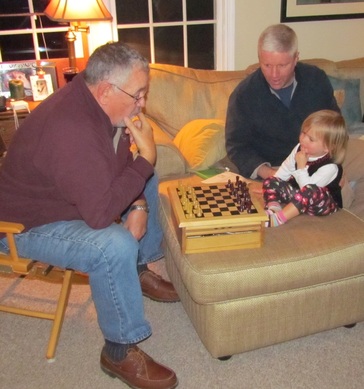
Twas the night after Thanksgiving, and as the turkey grew cold, a chess match developed, between a master and a two-year-old.

The pieces were moved with thought and care, as the tiny Bostonian faced off against the mighty Long Island Bear.

Pawn to king-3, and bishop to Queen-4, the opponents battled fiercely as knights and rooks fell to the floor.

Chins were scratched and all looked on while the pace grew faster; in short time, the student was becoming the master.

And how could it be, that at 10 times her weight,
by the end of the night, the big man found himself in CHECKMATE!


1 Comment

A Father

6/16/2013

5 Comments

 
Picture
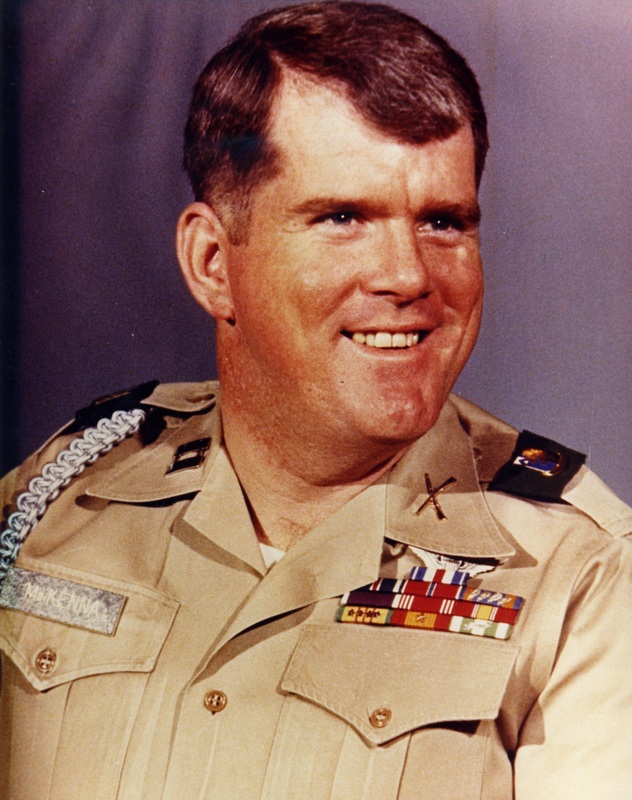
What does it mean to have a Father?  How has that person shaped you?  How are you connected?  Not having a Father present for most all of my life, one would think these questions would be difficult for me to answer - but are they?  Let's see ...
  • My Father liked Porsches
  • My Father enjoyed working with wood
  • My Father was a bit of an audiophile
  • My Father was prematurely gray, with blue eyes, and skin that burned like a true Irishman
  • My Father joined a fraternity in college - Zeta Psi
  • My Father was a bright man with a sense of humor
  • My Father was a U.S. Army helicopter pilot (OK, this one needs a hint: for half of my professional career, my work has been with the U.S. Army)
  • ...
There is no doubt in my mind that I am my Father's son.  Even though he never played a direct role in my life, he is a part of me - more than I would have ever thought (be it basic physical traits, interests, character, or strange coincidences).  And it seems that as the years tick by, this connection becomes clearer - and my connection to my Father becomes deeper.


5 Comments

A Very Special First Word

5/23/2013

2 Comments

 
Cutting right to the chase ...
2 Comments

Home Computing/Audio Upgrade Project

4/9/2013

5 Comments


The Need

We have been in our new home for almost a year now, and during this time, the subject of a music system has popped up regularly.  Music and video, to be precise.  The what, where, and how for each.  We had a pretty nice set up at the old place.  The TV was a nice SONY HDTV and we had/have a sweet Logitech Harmony One remote, which controlls the TV, DVD, NetFlix, and stereo.  The music system was a combination of a traditional component rack (Rotel pre-amp, Rotel amp, Technics CD changer, and NEC tuner) plus a digital music player - the Roku Soundbridge M1000.  The latter was the bomb.  It wirelessly accessed a dedicated PC that served up our entire music collection.  That PC was an antique - a Pentium II, 1.9 MHz headless desktop.  Long story, short, we are not able to replicate the Roku set up in the new house with the new Verizon cable modem/router.  Our home network runs WPA2 wireless security and the Roku is sufficiently old enough that it does not support said security protocol.  That, and the music server PC is starting to reach borrowed time status.  So, we needed a new scheme to play our digital music collection, which by the way, exceeds 7500 songs.  After some research and a fair bit of head-scratching, we have settled on a solution: NAS + SONOS.

Phase I: Set up media server (NAS)

Picture
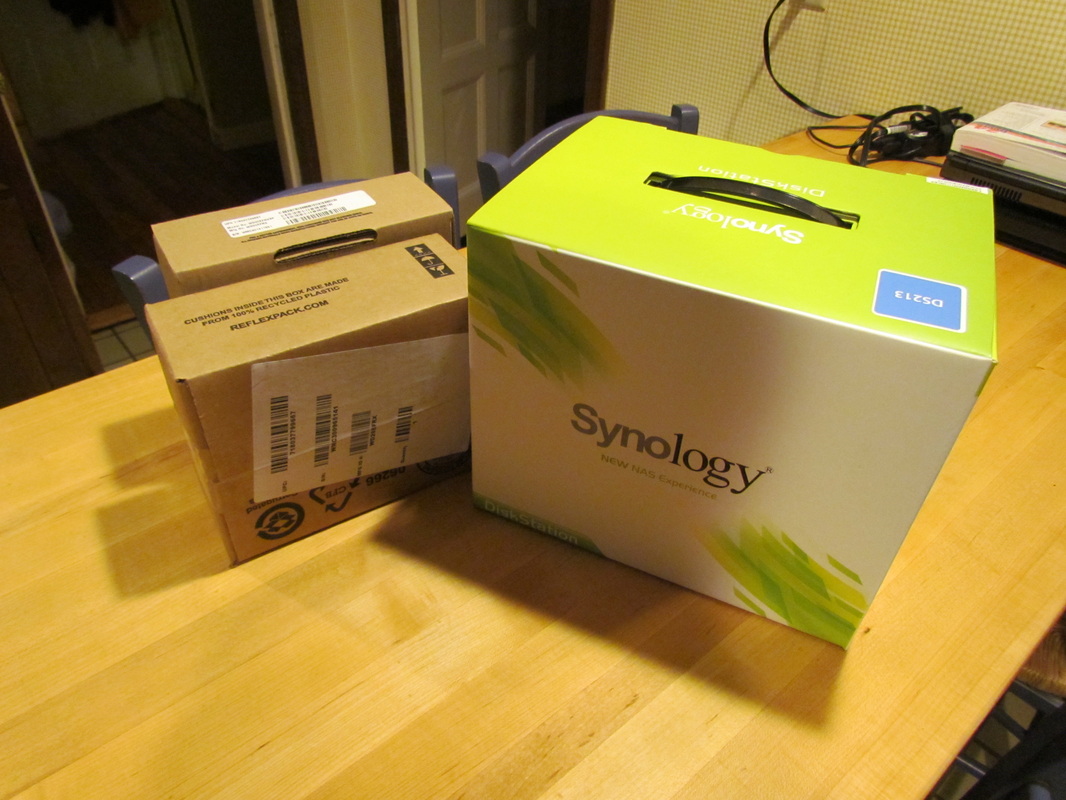
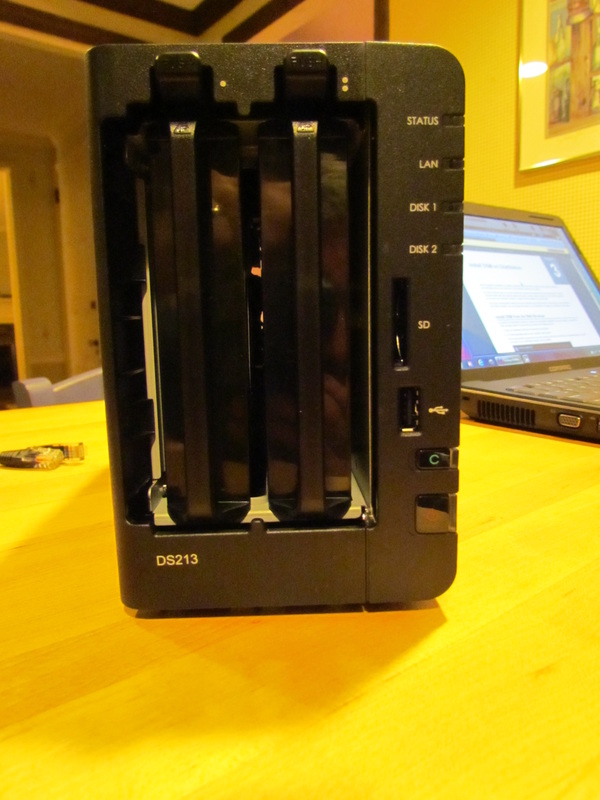
Synology DS213 NAS and two Western Digital drives, 2 TB each.
NAS.  Network Attached Storage.  Still not clear?  Basically, it's a big-a$$ hard drive that sits on your home network.  I'll avoid the details, but wikipedia (of course) explains it.  There are all sorts of NAS options ranging from rather simple and inexpensive (home use), to complex and pricey (business use).  Some basic options are made by Seagate (BlackArmor) and Western Digital (My Book).  These are truly plug-and-play.  Reviews for these were mixed though and I was not sold on either.  One brand that repeatedly seemed to emerge as well-reviewed was Synology.  The Synology units are not exactly plug-and-play, but if you are computer savvy, they are very straightforward.  When you buy a Synology NAS, all you get is the enclosure, which houses the brains, but no drives.  You need to buy your hard drives separately.  Not hard since Synology tells you what drives work.

Picture
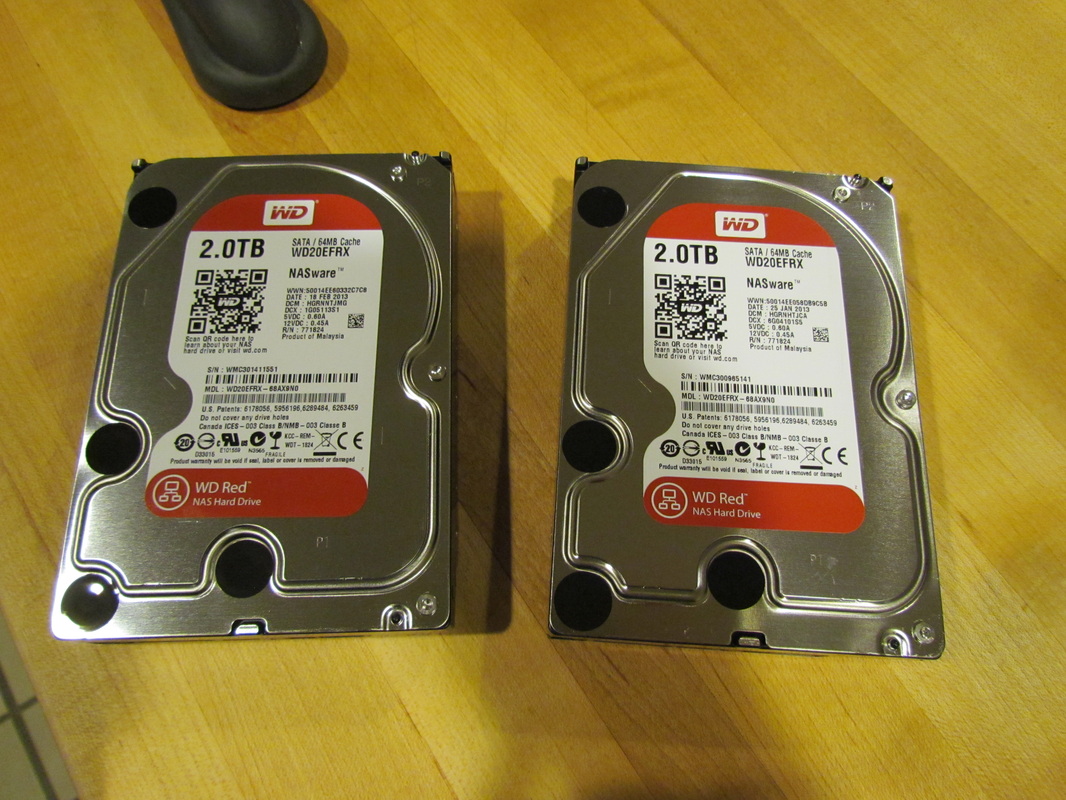
The two WD 2 TB drives - sweet.
I decided to go with a Synology DS213.  A bit overkill, but I'll have no issues down the road with scalability or features.  To go with the DS213, I got two Western Digital WD20EFRX drives, each with a 2-TB capacity.  One of the key features of many NAS devices is RAID support, which, in a nutshell, means "backup."  I am using a form of RAID specific to Synology, so I end up with 2 TB of actual storage - the other 2 TB are for the redundancy.  In the future, I have the ability to replace these drives with larger capacity ones, although, at present, I can't imagine needing more space.  (We are currently using about 5% of the storage space.)

Picture
Synology DS213 showing the 2 drive bays.
Getting the system up and running was easy.  Installing the drives was trivial and hooking the NAS to the network went smoothly.  This model, like most, requires a direct-wire connection to your network, so it needs to sit near your router.  You access the NAS via a web browser.  The software for the DS213 is very good, as advertised.  It has a wealth of features and capabilities, and as such, can be a bit overwhelming at times.  But, in the end, it rocks.  Besides being a  file server (basically, a shared network drive), the DS213 provides a music server, a photo server, a video server, and a bunch more stuff (ftp, email, webcam interface, VPN, +++).  Thus far, I have moved all our music off the old PC onto the NAS.  Our photos and videos, which resided on another PC, have also been relocated to the NAS.  After some more file transitioning, the old music server PC will be retired.  We will also be able to phase out our other PC - the photo one.  And lastly, I was just able to set the NAS up such that I can actually get to it from anywhere!  In other words, I can play my content from my home music collection from anywhere I have Internet access using my smartphone or another PC.  But the key will be playing music content at home ...

Phase II: Set up sound (SONOS)

Picture
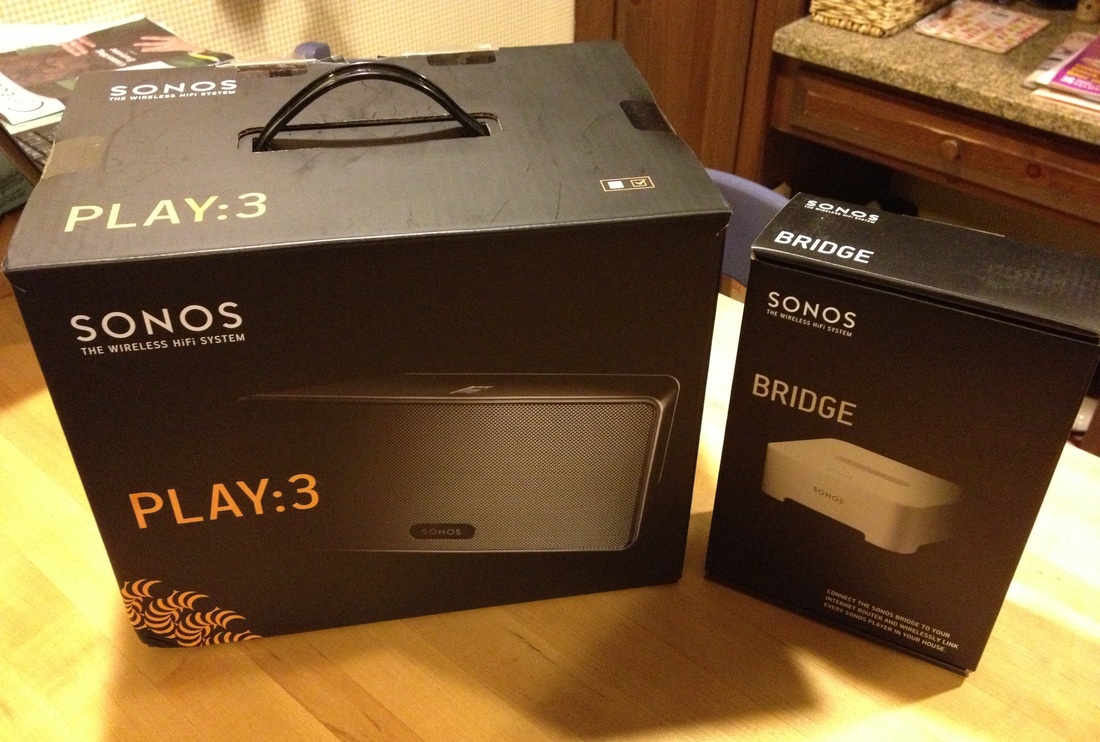
SONOS Play:3 and Bridge components.
15 minutes.  That's my guess at how long it took to go from opening boxes to hearing music.  The magic ... SONOS.  SONOS is a wireless music system.  In its most basic form, you stream Internet radio or your music library (from a NAS, say) to one of their standalone speaker units, like the Play:3 (there is also a bigger Play:5).  But, it can be configured to do much more.  For example, with another piece of SONOS hardware, you can wirelessly stream to your old, classic stereo system (amp+speakers).  But I am getting ahead of myself.

SONOS was part of my master plan from the outset.  The stuff is amazing.  So, I knew it would be the means to provide the sound, and it was, in large part, what drove the NAS purchase.   Since we are still sorting out the design/use of the living room space, the only place I knew I wanted sound was the kitchen.  To do that, I got the smaller Play:3 and the Bridge.  Unless your speaker is close to your router and can be directly Ethernet wired, you'll need the Bridge.  It connects to your router and then talks to the rest of your SONOS components.  It's cheap.  It's the speakers that cost a bundle.

The setup was simple.  Plug the Bridge into power and into the router via Ethernet cable.  Put the Play:3 where you want it and plug it into power.  Run the provided software, press a few buttons on each component to get it recognized on the SONOS network, and you're done.  The last key step is just to point the SONOS Controller software to your music library.  In my case, this was the shared music folder on the Synology NAS.  Then comes the fun part.  The SONOS Controller software is brilliant.  With it, you can:
  • Play music from your libary
  • Play playlists from your library
  • Play Internet radio
  • Control volume, shuffle, cross-fade
  • Play the same music across all your SONOS speakers throughout your home*
  • Play different music on each of your SONOS speakers throughout your home*
  • Control the volume of each speaker independently throughout your home*
  • And more.
*If you have multiple components, which is part of my plan.

Picture
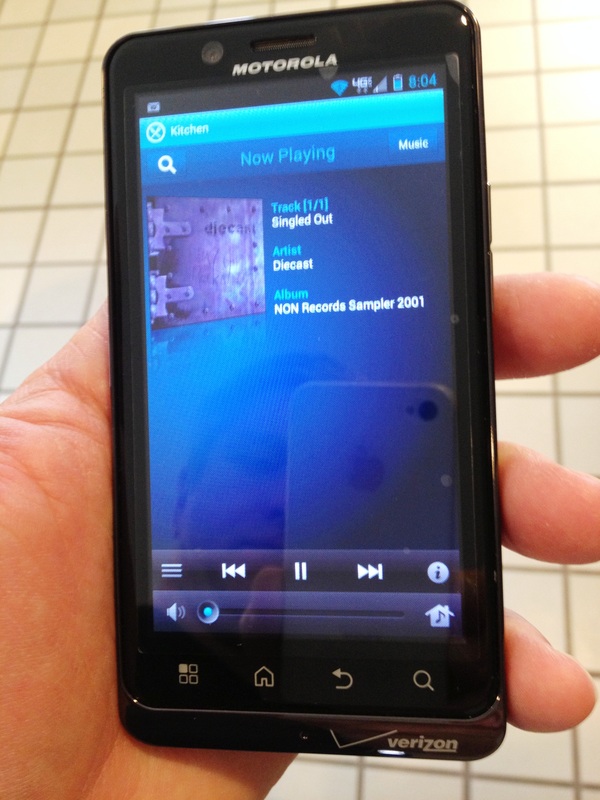
SONOS Controller on a Droid.


The SONOS Controller software runs on your PC as a basis.  But, you can also download their Controller app and run the whole system from your iPad/iPhone or Android device.  This how I plan to control the sound.

Phase III: Enjoy!

Indeed.  Not much to say here.  The sound is very good for the size of the speaker: tight and clear, mid-tones are strong and crisp, and the bass is decent.  (The speaker is made up of 1 tweeter, 2 mid-range drivers, and a bass radiator.)  But the coolest part is the system itself - the wireless, multi-room capability is just awesome.  And it is simple to get running. 'Nuf said.
5 Comments

Laughter as the Best Medicine

1/6/2013

2 Comments

 
As some of you know, this has been a tough few days for us - our good buddy Cosmo had to undergo major abdominal surgery on Friday to remove a stone from one of his ureters as well as one from his bladder.  All went well, but he's in pretty tough shape and we miss him greatly.  (He comes home Sunday!)  As they say, laughter is the best medicine, and while I was eating a Kane's Donut this morning, I had a rather amusing thought pop into my head.  The thought quickly germinated into the following post.  Enjoy and hopefully it will bring a laugh.

Eating a Kane's Donut is like having a –5-hour ENERGY drink.  (To clarify, I fail to experience the sugar high from eating such a rich donut, instead only feeling the subsequent food coma.)  What is a –5-hour ENERGY drink, you ask?  Read on.

About

Have a lot on your plate today?  Don’t really feel like doing any of it?  Lying around on the couch watching a day-long marathon of Battlestar Gallatica sound good to you?  If so, then you need –5-hour ENERGY!

Made for people who want to do nothing

Finding the ability to avoid work and family responsibilities is hard enough. Throw in a second job, go back to school, or simply have a restful night of sleep, and you’re bound to hit the ground running. So what do you do? Run for the Twinkies? Grab a couple glasses of red wine? But how long does that last before you need more? Try this instead:  Take one –5-hour ENERGY shot. It’s quick, simple, and made to help slackers like you.

What's in –5-hour ENERGY?

Made from the equivalent of a dozen glazed donuts, a hungry man stack of pancakes, and a full plate of Thanksgiving turkey, –5-hour ENERGY is sure to put you in a state of complete apathy and fatigue.  In fact, –5-hour ENERGY is so effective, you will come within inches of losing all will to live.

Why try –5-hour ENERGY?

  • Quick, simple, and effective
  • Fast and easy to consume
  • Zero herbal stimulants
  • 14,000 calories!
  • No vitamins nor amino acids
  • As much tryptophan as half a breast of a 16-lb turkey
  • Also available in –10-hour ENERGY version*
  •  Non carbonated
*There is a 1 in 5 chance of slipping into a coma when using –10-hour ENERGY.
2 Comments
<<Previous
Forward>>

    Archives

    December 2021
    March 2021
    September 2020
    April 2020
    November 2019
    February 2017
    September 2015
    August 2015
    September 2014
    August 2014
    July 2014
    April 2014
    March 2014
    November 2013
    June 2013
    May 2013
    April 2013
    January 2013
    September 2012
    May 2012
    March 2012
    January 2012
    December 2011
    October 2011
    September 2011
    August 2011
    July 2011
    June 2011
    May 2011
    April 2011
    March 2011
    February 2011
    January 2011
    December 2010
    November 2010
    May 2010
    April 2010
    February 2010
    January 2010
    December 2009
    November 2009
    October 2009
    September 2009
    August 2009
    July 2009

    Categories

    All
    Cyber
    Cyber Risk
    Cybersecurity
    Dogs
    Family
    Fun
    House
    Neighborhood
    Opinion
    Professional
    Risk
    Spam Press
    Sports
    Technology
    Travel
    Website

    RSS Feed

Copyright © 2025 the McKennas